Showing answer for What is Tabla Focus?
Getting started
What is Tabla Focus?
Tabla Focus is a tabla practice companion for iPhone and iPad. Lehra, the Taal Metronome, Tanpura, Tabla Tuner and Tabla Math support focused riyaz.
Keep your repertoire in bol notation, track pieces from first study to Performance Ready, and save handwritten notes in a private archive. Record and edit takes while preserving the originals. Review your practice history and Progress Report.
Prepare with a syllabus-based Mock Exam, and explore artists, gharanas and recordings through Parampara. Share encrypted .tabla compositions, use Siri hands-free, and follow your riyaz on the Lock Screen.
Built for lifelong sadhana, growing more valuable with every year of practice.
Getting started
Can tabla be learned independently, without a teacher?
न गुरोरधिकं तत्त्वं न गुरोरधिकं तपः।
There is no higher truth than the Guru, no higher discipline than the Guru
Guru Gita, Verse 75.
The short answer is no. Within this tradition, it is a settled truth that tabla is not mastered without the living guidance of a Guru, and Tabla Focus never pretends to replace that relationship. Instead it works as an earnest, relentless gurubhai — a practice peer built to make the solitary hours of riyaz count. It meets the hardest realities of the art head-on: the pull on motivation, the struggle for consistency, the sheer difficulty of tracking decades of progress. In the end it serves as a bridge back to the teacher — by letting a player export precise analytics, newly transcribed compositions, and granular progress data, it turns the time between lessons into real preparation, so every sitting face-to-face with a Guru counts for more.
Getting started
Does Tabla Focus have a lehra (nagma)?
Yes, and it's the most advanced lehra yet. The melody is only the start; the practice built around it is where it earns that claim.
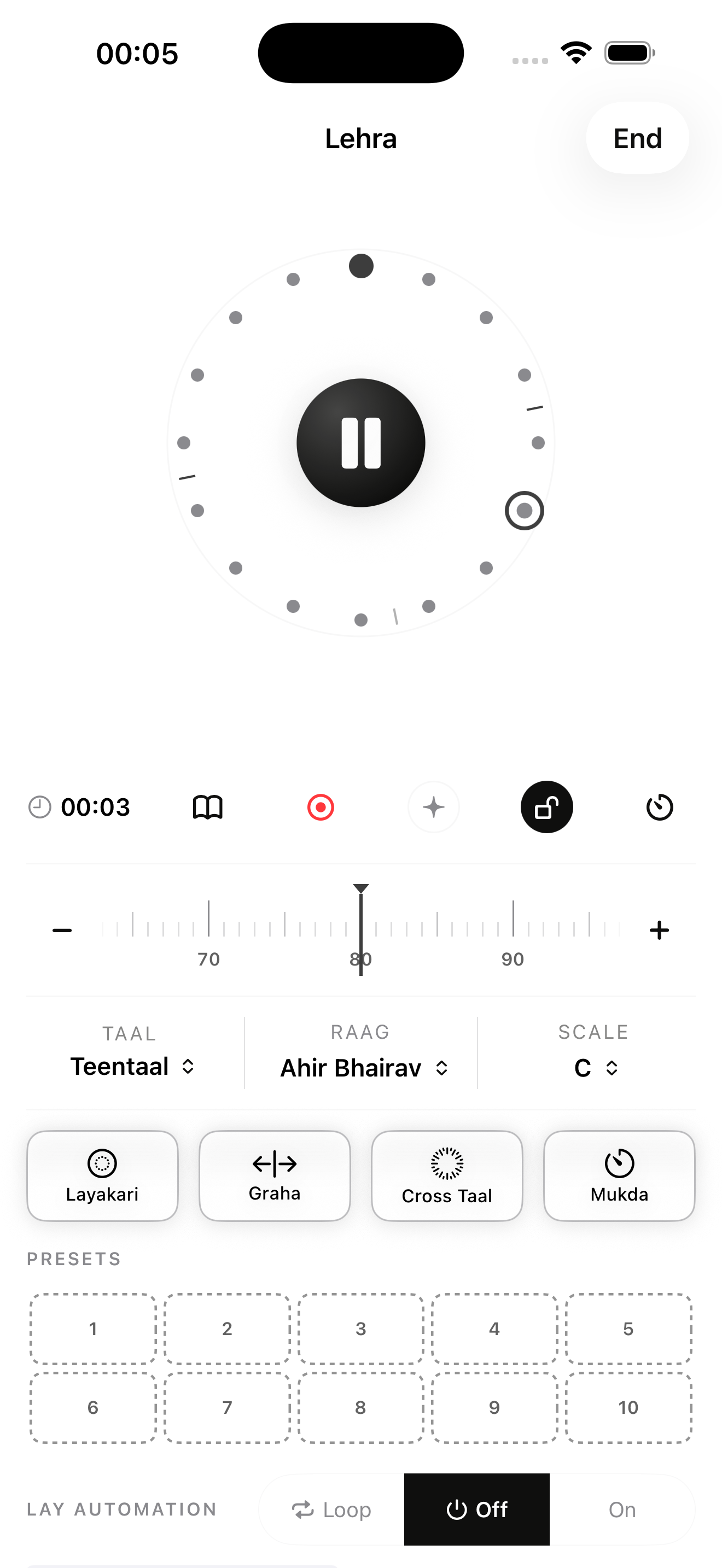
- Layakari. A layer on top of the lehra plays at a ratio to it — dugun, tigun, or an uneven one like 3:2. Fifteen ratios, from half speed to nine against four. When the strokes come too fast to follow, the strong beats keep sounding and the ones between drop to a whisper.
- Lay Automation. Set where the tempo should end and how long it should take, and it rises on its own while you play, in the shape you choose: even, settle first, sprint finish, or hold.
- Graha. Practise landing just off sam. The cycle's one open stroke moves a fixed distance from sam — a half or a quarter beat, early or late — and sam becomes a quiet tick, so the stroke you hear is the one you're aiming at.
- Mukda. One open stroke a chosen distance before sam, then silence, so your phrase runs into sam on its own.
- Cross Taal. A second taal fitted inside the one you're in, spread across the same cycle, so both sams land together every time around.
And if the lehra you want isn't there, hum it. Lehra Composer writes out what you sang, in the key you sang it, as notes you can edit. It marks any note it wasn't sure of rather than dropping it, doesn't claim to know raag, and never grades what you hummed.
Getting started
What else is there to practise with, besides the lehra?
Three more ways to sit down and play.
Taal Metronome — click-based practice.
- Every taal, one metronome: the theka is voiced beat by beat on a ring.
- Tap any beat to open or close its stroke while it plays.
- Any tempo and any sound, with Lay Automation to raise the tempo as you play.
- Half-matra taals such as Sunanda (9½) are here too; the short vibhag ticks at double speed.
Sangat — accompaniment practice with a real musician.
- A real singer carrying the nagma, backing beds to play freely against, and instrumental pieces with a real taal and Sa.
- The performer is credited on screen when the track starts.
- A track can hand you the cycle: it counts you in, the musician steps back for your solo, and it counts you back to the groove.
- Each part of the mix has its own level.
Sheet Music — play along with written music.
- Engraved public-domain scores from the Baroque, Classical, Romantic and Ragtime repertoire — Bach, Mozart, Beethoven, Scott Joplin and more.
- Play at your own tempo, with a count-in, a click, and a loop between any two notes.
Getting started
Is Tabla Focus free?
Yes. The full Taal Metronome — any taal, tempo and sound, with Lay Automation — plus the Tabla Tuner and Tanpura are free, with no account or membership needed. Guest metronome sessions are not saved.
Some free tools keep personal data, so they ask you to Sign in with Apple but never need a membership: reminders and data export among them. Siri answers and the Bibliography are free too.
Subscription
A weekly or annual subscription opens the rest of your practice: Lehra and Sangat, Lehra Composer, Sheet Music, Practice Progress and Analytics, your private Library for Compositions, Scan Notes, Recordings and Set List, Tabla Math, the Taal Guide, the Listening Room, Parampara and the Mock Exam. Eligible annual subscriptions include a three-day trial; weekly subscriptions do not. Sign in with Apple to subscribe or restore.
Getting started
Is Tabla Focus available on Android or the web?
Tabla Focus is an iPhone and iPad app. On the web, Focus Studio already includes a public compositions library and editor, Tabla Math, the Taal Guide and the glossary; more browser tools are on the way. Android is not available at present.
Features
Can custom compositions be created and shared in the library?
Yes. Transcribe kaidas, relas, tukras and phrases with the bol keyboard, in Latin or Devanagari script, each held with its taal and context, and follow every piece from Study Reserve to Performance Ready. Finished pieces take their place in a printable Set List — your own collection, in the tabla's own notation, kept for years. Any composition can be shared as a .tabla file over AirDrop, messaging or any share sheet, and another player can import it straight into their own Library.
You don't have to start from a blank page. The verified compositions are a shared library of kaidas, relas and tukras, each checked before it is published. Add any of them to your Library and they become ordinary pieces of your own: tracked from Study Reserve like anything else, editable, and yours to keep.
Features
How does the app improve speed and layakari?
Gradually, which is the only honest way. Lay Automation steps the tempo toward a target over a chosen number of avartans, so speed builds inside the cycle rather than by force. The Lehra's layakari layer plays dugun, tigun, aad and beyond against the cycle, each whole-number laya with its own stresses, so the ear learns how each one resolves at sam. Graha and Mukda place a single target stroke off sam or into it, for phrases that must land precisely. And Tabla Math works out tihais, chakradhars and layakari arithmetic before your hands touch the tabla.
Features
Can Tabla Focus track practice, like a riyaz tracker?
Yes, and it's measured in years, not days. Every riyaz, minute, active day and taal goes into one private record. The Practice Progress tile under Start Practice opens it, the Activity log holds the history, and at the end of each month Analytics reads it back as plain observations. The Activity Map shows the shape of your practice at a glance, and the Lifetime Progress Report gathers it all into a PDF. No leaderboards, no rankings, no comparisons — a record that belongs to the player alone.
Features
Where do handwritten notes and recordings go?
Into your own iCloud. Scan Notes turns years of notebook pages into one private archive you can reach from any of your devices. Recordings captures a practice take or a performance and lets you trim it, add fades and set its level. Both stay on your device and in your own iCloud storage; neither is kept on Tabla Focus servers.
Use cases
Does Tabla Focus work offline?
Yes. Tabla Focus is built to work offline, whether you use the free tools or a membership. Your practice tools and personal content stay available on your device; when you reconnect, private iCloud content and account-backed practice data update. Sangat tracks you download play offline too.
Features
Does Tabla Focus work on iPad, and is it accessible?
Yes. Tabla Focus is built for iPad as well as iPhone, with keyboard shortcuts on iPad. Accessibility is built in: VoiceOver for independent practice, Voice Control, Larger Text and Reduced Motion.
Privacy & data
How is data stored?
Use the Taal Metronome, Tabla Tuner and Tanpura without an account; guest metronome sessions are not saved. With Sign in with Apple, your practice history is private to your account.
Compositions, Scan Notes and Recordings stay in your private iCloud. The Tabla Tuner listens live and never records audio. Tabla Focus has no ads or tracking. You can export account data or delete your account in Settings → Account & Data.