
Every tabla player has a favourite lehra, often more than one. Returning to it feels like coming home to the familiar turn of the phrase, the space before sam and the arrival you know by ear. It becomes part of the riyaz.
The choice changes with the work. Clear entries help when checking lay, whereas another melody or instrument may suit a more exploratory sitting. Raag, taal, speed and sound all matter. Tabla Focus includes traditional lehras for commonly practised taals, with harmonium-based melodies and recorded sitar lehras. Lehra Composer makes room for the nagma you want beyond that collection. For how the lehra itself works in Tabla Focus, see lehra for tabla practice.
Sing a nagma and bring it into riyaz
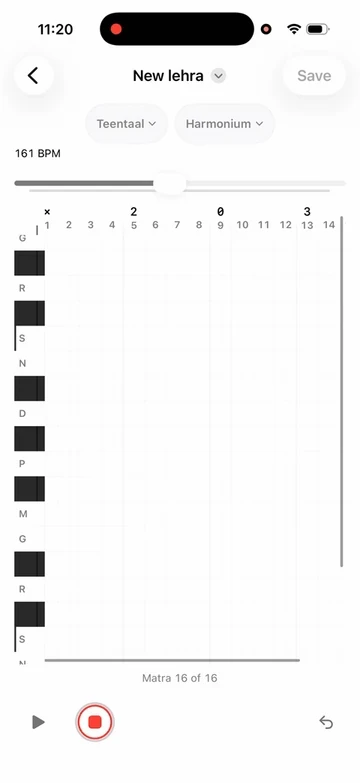
Choose the taal, instrument and tempo. After the count-in, hum or sing one avartan. The app turns the take into notes and plays them through the selected instrument. You can also enter the melody directly in the piano roll.
The workflow begins with the taal because a lehra needs a place in the cycle. After the count-in establishes the lay, one avartan defines what will repeat. There is no long recording to cut down before hearing the result.
Listen through the return to sam. Adjust anything that sounds misplaced, then name and save the melody. It appears under Your lehras, alongside the app’s existing choices, ready for the next sitting.
Adjust the sur, entry and hold
Once recording is complete, the notes appear on the piano roll: a WYSIWYG (what you see is what you get) editor where you adjust the lehra directly on the grid. Higher and lower rows represent pitch, while moving across the grid follows the matras. A note’s width shows its duration, with vibhag boundaries keeping the taal in view.
Touch a note to hear it. Drag it up or down to change the sur, or sideways to change where it enters. Stretch its right edge to lengthen the hold. There is no need to sing the whole nagma again.
Place the sur. Adjust the hold.
Drag the note to change its entry and pitch. Drag its right edge to change duration. You can also use the buttons below.
A schematic of the gesture, not a recording or app simulation.
The selected note has a resize target larger than the thin mark on screen. Zoom opens up the matras without shrinking the pitch rows. Empty space lets you pan, and each completed drag can be undone. VoiceOver actions and direct note entry offer the same corrections without a precise touch gesture.
How does a sung tune become a lehra?
The app records audio, finds the notes, then plays those notes using instrument samples. The saved lehra can therefore change in pitch, timing or sound without requiring another recording.
Pitch analysis runs on the device. After Probabilistic YIN finds possible pitches,1 Viterbi decoding follows a likely path through them.2 A second pass identifies separate note entries from changes in pitch and attack, because singing the same sur twice must remain distinguishable from holding it once.
One held sur, or two separate entries?
Synthetic example · a shared time axis links pitch, articulation and note boundaries
The app then assigns the notes and estimates Sa. Its initial duration rule holds each note until the next entry, so a breath may become a longer instrumental hold. Listen and shorten it where needed. The recording path is designed for a single hummed or sung melody.
Timing is measured against the recorded reference for sam and stored in fractions of a matra. The current format uses 480 ticks per matra. Zooming the editor changes only the view, so the note keeps its position in the taal.
For playback, Sa and the note’s pitch select an instrument sample. The audio engine schedules that sample at the note’s entry and renders its hold. MIDI export carries the pitches and timings, while the instrument samples supply the sound. A take and its Sa are accepted together as one undoable edit, so a correction can be tried without losing the earlier melody.
The result is a saved nagma that stays open to correction and can accompany the next avartan.
Sources
- Matthias Mauch and Simon Dixon. “pYIN: A Fundamental Frequency Estimator Using Probabilistic Threshold Distributions.” Proceedings of IEEE ICASSP 2014: 659–663. https://doi.org/10.1109/ICASSP.2014.6853678.
- Andrew J. Viterbi. “Error Bounds for Convolutional Codes and an Asymptotically Optimum Decoding Algorithm.” IEEE Transactions on Information Theory 13, no. 2 (1967): 260–269. https://doi.org/10.1109/TIT.1967.1054010.